

How to Measure Pharyngoesophageal Segment Maximal Opening (PES Max)
Pharyngoesophageal Segment (PES) Maximal Opening
Pharyngoesophageal segment (PES) maximal opening is defined as the narrowest point between C3-C6 when the PES is maximally distended during the swallow. This could be at any point between the superior border of C3 and the inferior border of C6, and should extend across from the cricoid lamina anteriorly to the posterior pharyngeal wall posteriorly.
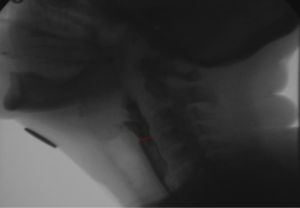
Identifying and Measuring PES Max
1. Identify anatomical landmarks 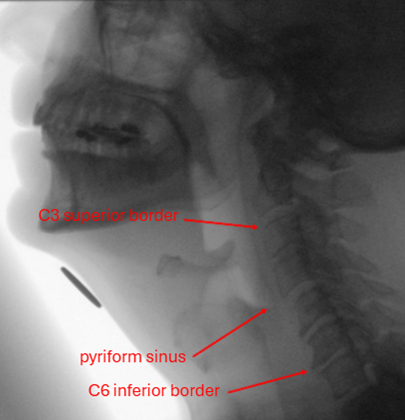
- C3 (superior border)
- C6 (inferior border)
- Pyriform sinuses
2. Identify the PES at rest
- The expected location of the PES is at the level of the cricopharyngeus muscle, which sits at the junction of the inferior hypopharynx and upper esophagus, typically anterior to C5-C6.
3. During the swallow, track the PES as it reaches maximal opening
- Note that the PES will move superiorly during the swallow as the pharynx shortens; therefore, PES Max will also move superiorly during swallowing.
- If the patient requires multiple swallows for a given trial (e.g. 3 swallows for a single pudding bolus), select the swallow that transferred the largest proportion of the bolus, and measure PES Max for that swallow.
4. Identify PES Max
If there is only one narrowing:
- Identify the point at which the hypopharynx and upper esophagus are maximally distended during the swallow; maximal distention of the PES will occur during this time.
- Toggle between frames to identify maximal distension of the PES; then, identify the narrowest point.
- Then, toggle between frames to track the same narrow point, until it is at its widest opening.
If more than one narrowing is identified, select the narrowest opening.
- Toggle back and forth, assessing each narrowing individually, to identify which is the narrowest when it is most distended.
Considerations:
- PES Max will always be inferior to the pyriform sinuses (i.e., ensure you are measuring below the pyriform sinuses and not in the pharynx, even if the pharynx is within C3-C6).
- There may be contrast and/or air running through the lumen at the point of maximal distension; account for this when identifying PES Max.
- PES Max will always occur while the PES is completely open (i.e., before the PES starts to close).
5. Draw a line at the narrowest point of the PES
- Identify the direction of bolus flow through the esophagus. See images A) and B).
- At the narrowest point, draw a line perpendicular to the direction of bolus flow, capturing the shortest distance across the lumen.
A) 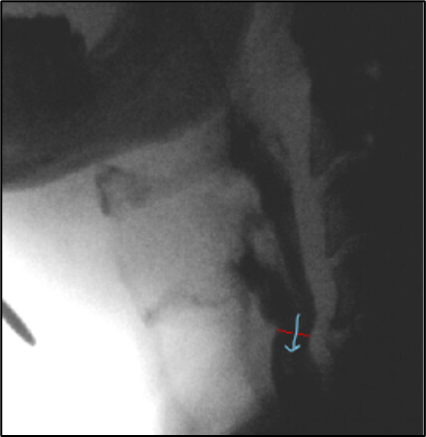 B)
B) 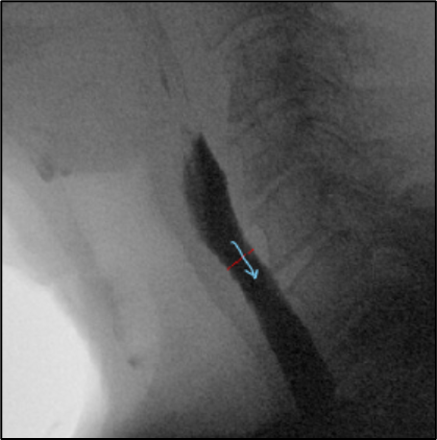
Additional Information
Setting up the Videofluoroscopic Swallowing Study (VFS)
When collecting VFS data, tape a calibration object to the underside of the participant’s chin. Ensure the calibration object is round and metal, and of a known diameter (e.g., a Canadian quarter – 2.38cm; US penny – 1.905cm; a ball bearing of 1cm).
This will act as a reference point for anatomical calibration (i.e., to determine the dimensions of area for a given individual by comparing it to an object of a known size).
Measuring PES Max in SwallowTail*
Calibration
The VFS video must be calibrated before completing area measures. Follow these instructions to calibrate the video in SwallowTail:
- Open the video in SwallowTail; the calibration screen will appear.
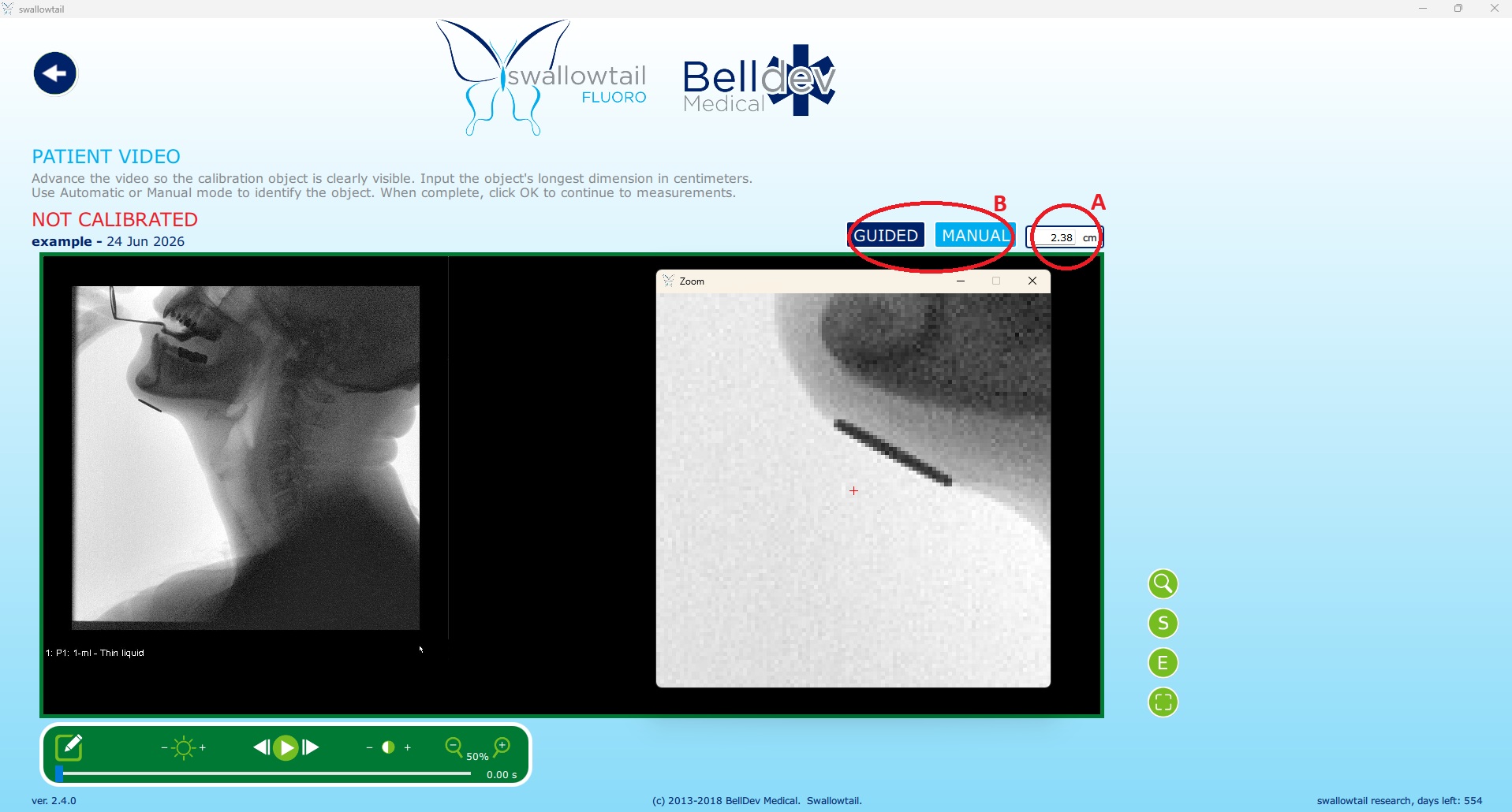
- Input the known reference measurement (e.g., 2.38 cm) in the top right field (A).
- Select either the guided or manual option for calibration (B), and measure the calibration object accordingly:
- Guided: hover your cursor over the object and click when the blue circle appears, taking note to ensure the blue circle accurately detects the object.
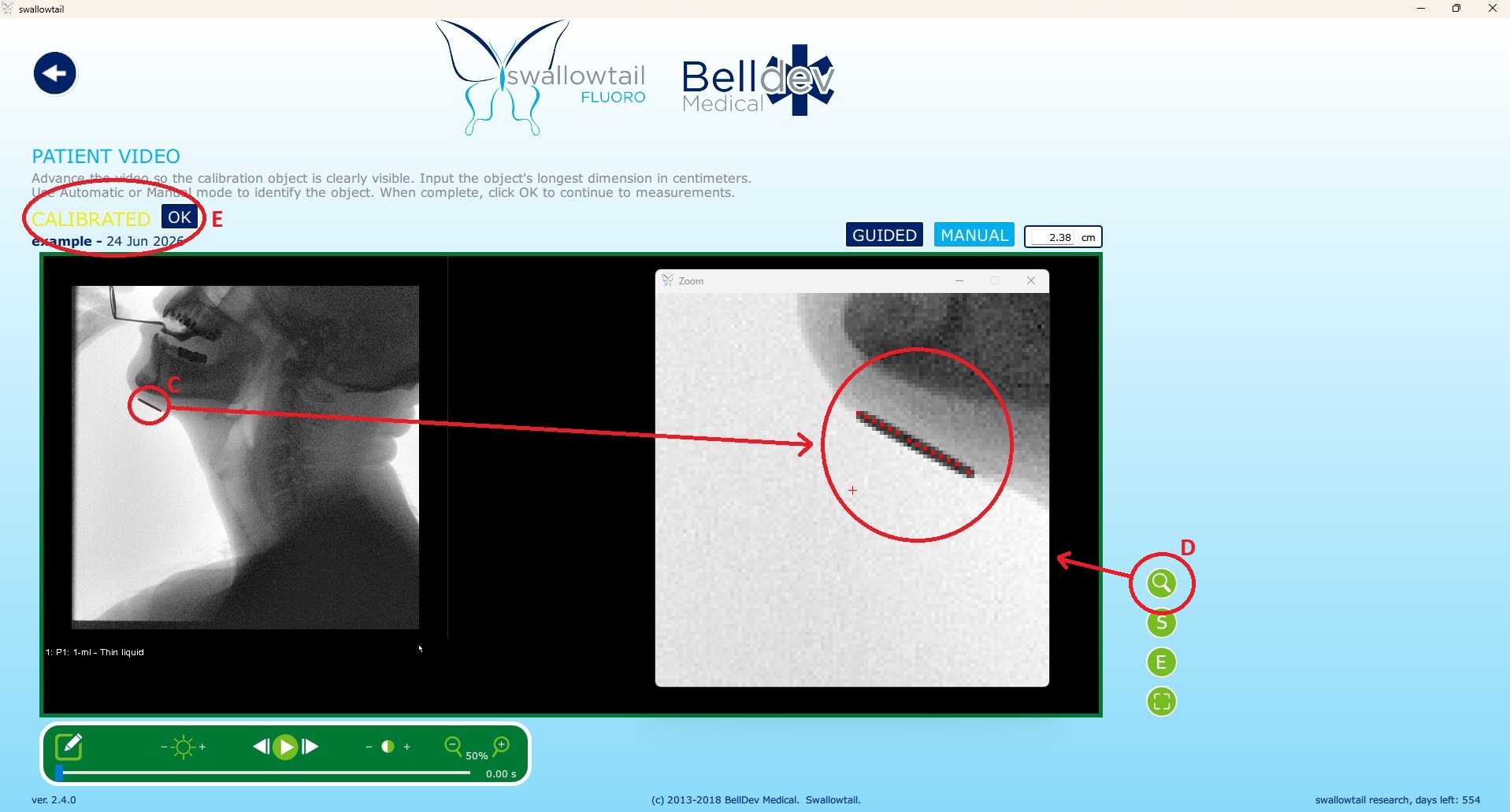
- Manual: click the calibration object at your beginning point, then hold the curser and drag it across the object (C). Use the zoom function (magnifying glass icon) to optimize precision (D).
- Right click to undo your line, if needed.
- Once calibration is complete, click OK; you will be taken to the measurement screen.
Obtaining a PES Max Measure
When you have identified PES Max (see instructions above):
- Click on the line measurement
- Write down the measurement name (e.g., PES MaxQ1, PES MaxQ4) in the measurement name
- Click accept.
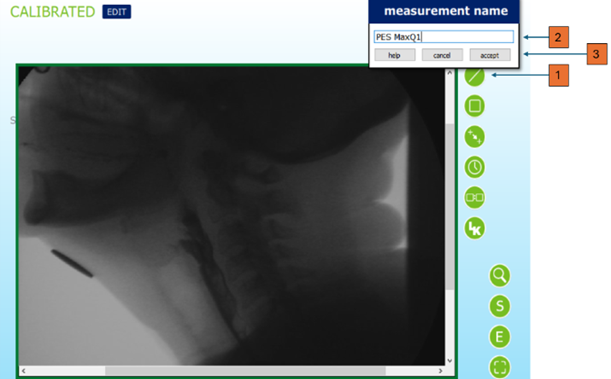
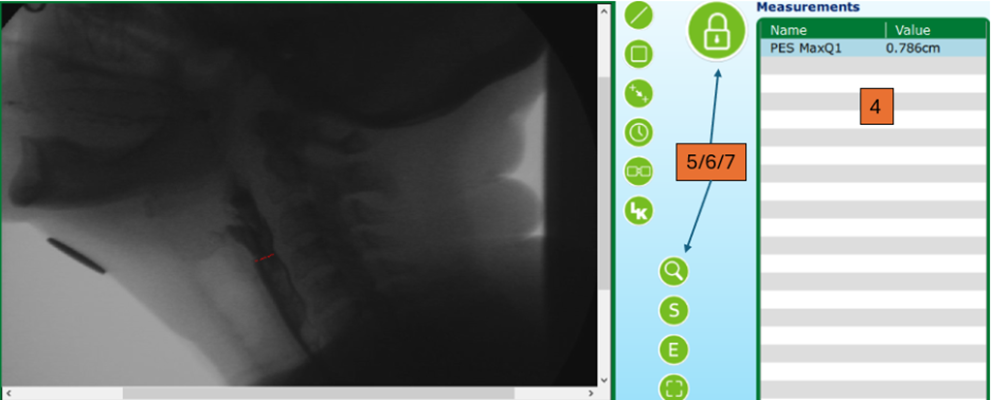
- Your line measurement will appear under Measurements on the right side of the screen.
- Taking the measure:
- When you first accept the PES Max line measure, a red lock will appear, showing that the measure is unlocked/editable.
- While the line measurement is unlocked, click and drag the mouse to create a line.
- Use the zoom function (magnifying glass icon) to optimize precision.
- The value of the PES Max will appear in the value column under measurements on the right side of the screen.
- Editing the measure:
- While the measure unlocked, right click to undo the line.
- Locking the measure:
- To lock the measure, click the red lock button. The green lock indicates that the measure is locked/unable to be edited.
- The measure can be edited at any time by clicking the lock to turn it red.
* Swallowtail version 2.4 (Belldev Medical, LLC) is based on the quantitative measurement methodology developed by Dr. Rebecca Leonard and Dr. Katherine Kendall at the University of California, Davis